uniapp+微信小程序使用svga动画(svgaplayer.weapp二次封装)
目录
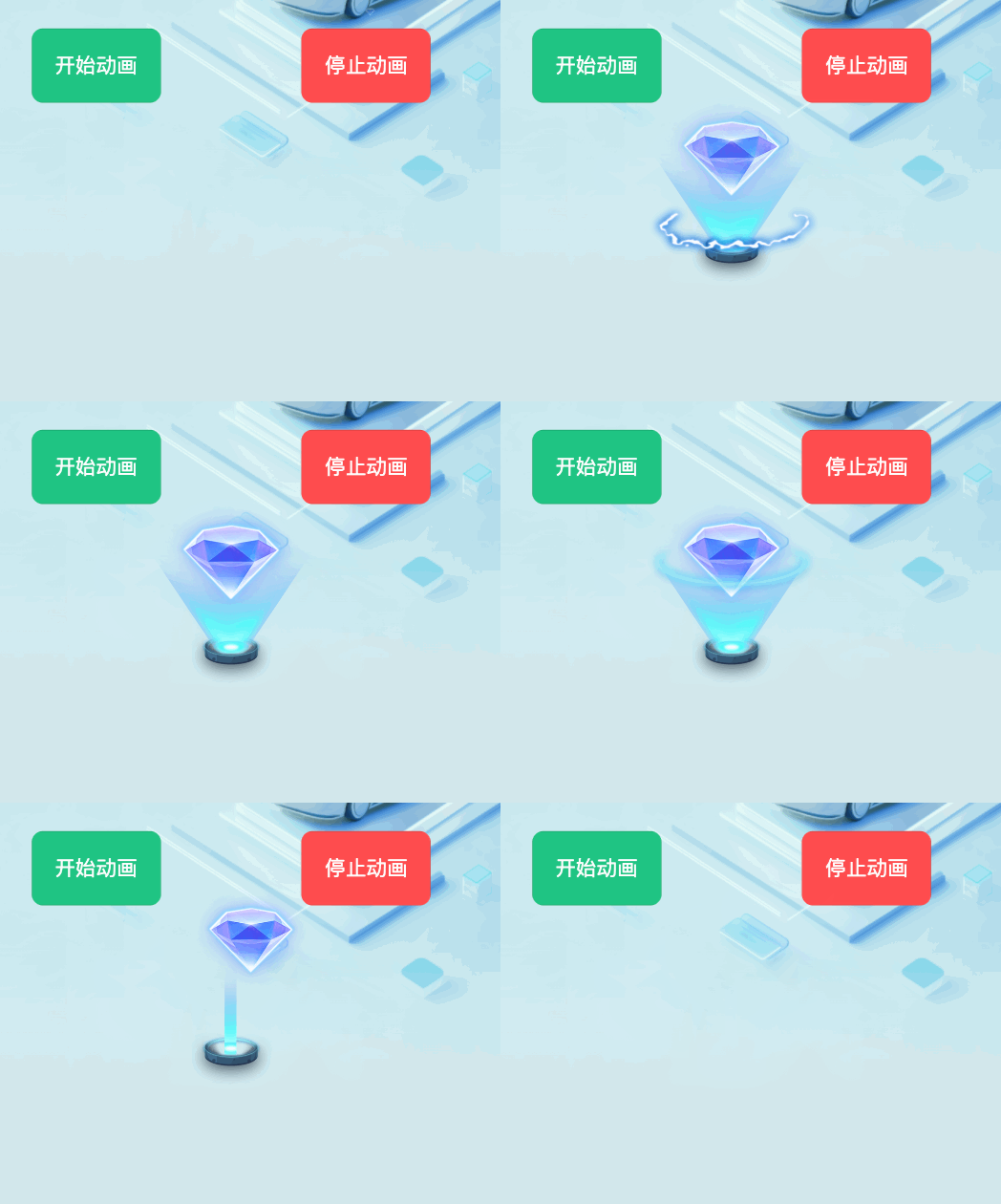
效果
概述 本项目使用 svgaplayer.weapp.js 库来实现 SVGA 动画播放功能,支持在微信小程序、H5 等多端环境下播放高质量的矢量动画。SVGA 是一种跨平台的开源动画格式,具有文件小、渲染性能高的特点。
技术栈
核心库 : svgaplayer.weapp.js (专为小程序优化的 SVGA 播放器)框架 : Vue 3 + Composition API平台 : 支持微信小程序、H5 等多端
项目结构 1 2 3 4 5 6 7 8 9 10 11 12 13 src/ ├── components/ │ ├── common/ │ │ └── svgaPlayer.vue # SVGA播放器核心组件 │ └── AnimationTemplate/ │ ├── index.vue # 简化版动画模板组件 │ └── AnimationTemplate.vue # 高级动画模板组件 ├── static/ │ └── js/ │ └── svgaplayer.weapp.js # SVGA播放器库文件 └── pages/ └── sale-entry/ └── index.vue # 使用示例页面
核心组件 1. SvgaPlayer 组件 (src/components/common/svgaPlayer.vue) 这是 SVGA 播放的核心组件,负责加载、解析和播放 SVGA 动画文件。
主要特性:
支持本地和远程 SVGA 文件加载
内置缓存机制,避免重复加载
支持循环播放、播放控制
提供丰富的回调函数
自动适配不同平台的 Canvas API
2. AnimationTemplate 组件 基于 SvgaPlayer 的封装组件,提供了更易用的动画展示模板。
主要特性:
全屏遮罩展示
支持多种位置布局(居中、顶部、底部)
自动播放完成后隐藏
支持手动关闭按钮
使用方法 基础使用
引入组件
1 2 3 4 5 6 7 8 9 10 11 12 13 14 15 16 17 18 19 20 21 22 23 24 25 26 27 28 29 30 31 32 33 34 35 36 <template> <view> <!-- 基础使用 --> <SvgaPlayer ref="svgaPlayerRef" :url="animationUrl" :width="300" :height="300" :canvas-id="'myCanvas'" :loops="1" :clears-after-stop="true" /> <!-- 模板组件使用 --> <AnimationTemplate ref="animationTemplateRef" :animation-url="animationUrl" :width="400" :height="400" :loops="1" :show-close-button="true" @close="handleAnimationClose" @animationStart="handleAnimationStart" @animationEnd="handleAnimationEnd" /> </view> </template> <script setup> import SvgaPlayer from '@/components/common/svgaPlayer.vue'; import AnimationTemplate from '@/components/AnimationTemplate/AnimationTemplate.vue'; const svgaPlayerRef = ref(null); const animationTemplateRef = ref(null); const animationUrl = 'https://static.wxb.com.cn/frontEnd/files/common/aidfinal1.svga'; </script>
程序化控制
1 2 3 4 5 6 7 8 9 10 11 12 13 14 15 16 17 18 19 20 21 22 23 24 25 26 27 28 29 30 const startAnimation = ( if (animationTemplateRef.value ) { setupAnimationCallbacks (); animationTemplateRef.value .startAnimation (); } }; const setupAnimationCallbacks = ( if (animationTemplateRef.value ) { animationTemplateRef.value .setOnFinished (() => { console .log ('动画播放完成' ); animationTemplateRef.value .hide (); }); animationTemplateRef.value .setOnFrame ((frame ) => { console .log ('当前帧:' , frame); }); animationTemplateRef.value .setOnPercentage ((percentage ) => { console .log ('播放进度:' , Math .round (percentage * 100 ) + '%' ); }); } };
API 接口 SvgaPlayer Props
参数
类型
默认值
说明
url
String
必传
SVGA 文件的 URL 地址
width
String/Number
300
动画宽度
height
String/Number
300
动画高度
canvasId
String
‘svgaCanvas’
Canvas 元素的 ID
loops
Number
1
循环播放次数,0 表示无限循环
clearsAfterStop
Boolean
false
播放完成后是否清除画布
SvgaPlayer Methods
方法名
参数
说明
initPlayer()
-
初始化播放器
preload(url, callback)
url: 预加载的 URL <br>callback: 回调函数
预加载 SVGA 文件
showSvga()
-
显示并播放动画
startAnimation()
-
开始播放动画
stopAnimation(clear)
clear: 是否清除画布
停止播放动画
pauseAnimation()
-
暂停播放动画
setOnFinished(callback)
callback: 回调函数
设置播放完成回调
setOnFrame(callback)
callback: 回调函数
设置帧回调
setOnPercentage(callback)
callback: 回调函数
设置进度回调
AnimationTemplate Props
参数
类型
默认值
说明
animationUrl
String
必传
SVGA 文件的 URL 地址
width
String/Number
300
动画宽度
height
String/Number
300
动画高度
canvasId
String
‘animationTemplateCanvas’
Canvas 元素的 ID
loops
Number
1
循环播放次数
clearsAfterStop
Boolean
false
播放完成后是否清除画布
showCloseButton
Boolean
true
是否显示关闭按钮
backgroundOpacity
Number
0.5
背景遮罩透明度
position
String
‘center’
动画位置:’center’, ‘top’, ‘bottom’
zIndex
Number
9999
层级索引
AnimationTemplate Methods
方法名
参数
说明
show()
-
显示动画
hide()
-
隐藏动画
startAnimation()
-
开始播放动画
stopAnimation()
-
停止播放动画
preloadAnimation()
-
预加载动画
setOnFinished(callback)
callback: 回调函数
设置播放完成回调
setOnFrame(callback)
callback: 回调函数
设置帧回调
setOnPercentage(callback)
callback: 回调函数
设置进度回调
AnimationTemplate Events
事件名
参数
说明
close
-
动画关闭时触发
animationStart
-
动画开始播放时触发
animationEnd
-
动画播放结束时触发
配置参数 SVGA 库配置 SVGA 播放器支持多种路径配置,组件会自动尝试以下路径:
1 2 3 4 5 6 7 8 require ('../../static/js/svgaplayer.weapp.js' );require ('/static/js/svgaplayer.weapp.js' );require ('./svgaplayer.weapp.js' );
Canvas 配置
类型 : type="2d" (推荐使用 2D Canvas)像素比 : 自动适配设备像素比大小 : 支持响应式尺寸设置
最佳实践 1. 性能优化 1 2 3 4 5 6 7 8 9 const preloadAnimations = async ( if (svgaPlayerRef.value ) { await svgaPlayerRef.value .preload (animationUrl); } }; const svgaCollection = {};
2. 错误处理 1 2 3 4 5 const handleAnimationError = ( console .error ('SVGA动画加载失败' ); };
3. 内存管理 1 2 3 4 5 6 onUnmounted (() => { if (animationTemplateRef.value ) { animationTemplateRef.value .stopAnimation (); } });
4. 平台兼容 1 2 3 4 5 const checkSVGASupport = ( return typeof SVGA !== 'undefined' ; };
常见问题 Q1: 动画播放不显示或报错? A1 : 检查以下几点:
确认 SVGA 文件 URL 是否正确且可访问
检查 Canvas 元素是否正确渲染
查看控制台是否有 SVGA 库加载错误
Q2: 动画播放卡顿或性能问题? A2 : 优化建议:
使用预加载功能提前加载动画文件
控制动画尺寸,避免过大的 Canvas
及时清理不需要的动画实例
Q3: 在不同平台表现不一致? A3 : 处理方案:
组件已内置多平台适配逻辑
如遇问题,检查是否使用了平台特定的 API
确保 SVGA 文件格式符合标准
Q4: 动画播放完成后如何处理? A4 : 使用回调函数:
1 2 3 4 animationRef.value .setOnFinished (() => { console .log ('动画播放完成' ); });
示例代码 完整使用示例 1 2 3 4 5 6 7 8 9 10 11 12 13 14 15 16 17 18 19 20 21 22 23 24 25 26 27 28 29 30 31 32 33 34 35 36 37 38 39 40 41 42 43 44 45 46 47 48 49 50 51 52 53 54 55 56 57 58 59 60 61 62 63 64 65 66 67 68 69 70 71 72 73 74 75 76 77 78 79 80 81 82 83 84 85 86 87 88 89 90 91 92 93 94 95 96 97 98 99 100 <template> <view class="animation-demo"> <!-- 触发按钮 --> <button @click="startAnimation">开始播放动画</button> <!-- SVGA动画组件 --> <AnimationTemplate ref="animationTemplateRef" :animation-url="animationUrl" :width="400" :height="400" :loops="1" :show-close-button="true" position="center" @close="handleAnimationClose" @animationStart="handleAnimationStart" @animationEnd="handleAnimationEnd" /> </view> </template> <script setup> import { ref, onMounted, onUnmounted } from 'vue'; import AnimationTemplate from '@/components/AnimationTemplate/AnimationTemplate.vue'; // 组件引用 const animationTemplateRef = ref(null); // 动画配置 const animationUrl = 'https://static.wxb.com.cn/frontEnd/files/common/aidfinal1.svga'; // 开始播放动画 const startAnimation = () => { if (animationTemplateRef.value) { setupAnimationCallbacks(); animationTemplateRef.value.startAnimation(); } }; // 设置动画回调 const setupAnimationCallbacks = () => { if (animationTemplateRef.value) { // 播放完成回调 animationTemplateRef.value.setOnFinished(() => { console.log('SVGA动画播放完成'); animationTemplateRef.value.hide(); uni.showToast({ title: '动画播放完成', icon: 'success', duration: 1500, }); }); // 帧回调(可选) animationTemplateRef.value.setOnFrame((frame) => { console.log('当前帧:', frame); }); // 进度回调(可选) animationTemplateRef.value.setOnPercentage((percentage) => { console.log('播放进度:', Math.round(percentage * 100) + '%'); }); } }; // 事件处理 const handleAnimationClose = () => { console.log('动画被手动关闭'); }; const handleAnimationStart = () => { console.log('动画开始播放'); }; const handleAnimationEnd = () => { console.log('动画播放结束'); }; // 生命周期 onMounted(() => { // 可以在这里预加载动画 if (animationTemplateRef.value) { animationTemplateRef.value.preloadAnimation(); } }); onUnmounted(() => { // 清理资源 if (animationTemplateRef.value) { animationTemplateRef.value.stopAnimation(); } }); </script> <style lang="scss" scoped> .animation-demo { padding: 20rpx; } </style>
基础播放器示例 1 2 3 4 5 6 7 8 9 10 11 12 13 14 15 16 17 18 19 20 21 22 23 24 25 26 27 28 29 30 31 32 33 34 35 36 37 38 39 <template> <view class="basic-player"> <SvgaPlayer ref="svgaPlayerRef" :url="animationUrl" :width="300" :height="300" :canvas-id="'basicCanvas'" :loops="0" :clears-after-stop="false" /> <view class="controls"> <button @click="play">播放</button> <button @click="pause">暂停</button> <button @click="stop">停止</button> </view> </view> </template> <script setup> import { ref } from 'vue'; import SvgaPlayer from '@/components/common/svgaPlayer.vue'; const svgaPlayerRef = ref(null); const animationUrl = 'https://static.wxb.com.cn/frontEnd/files/common/aidfinal1.svga'; const play = () => { svgaPlayerRef.value?.startAnimation(); }; const pause = () => { svgaPlayerRef.value?.pauseAnimation(); }; const stop = () => { svgaPlayerRef.value?.stopAnimation(true); }; </script>
总结 本 SVGA 动画插件为项目提供了完整的矢量动画播放解决方案,具有以下优势:
高性能 : 基于 Canvas 2D 渲染,支持硬件加速跨平台 : 支持微信小程序、H5 等多端环境易用性 : 提供了简单易用的组件 API功能完整 : 支持播放控制、回调监听、预加载等功能稳定性 : 内置错误处理和资源管理机制
通过合理使用这些组件和 API,可以在项目中轻松实现高质量的动画效果,提升用户体验。
维护信息
文档版本: 1.0.0
最后更新: 2025 年 7 月 8 日
维护者: 开发团队